When you first log in, you are on the Ad Management Dashboard. The Ad Management Dashboard can be broken down as follows:
Stations Not Inserting Ads:
Field and button definitions:
| Item | Description |
|
Station |
Click this column title to sort the list by station name. |
|
Last recorded ad impression |
Click this column title to sort the list by the date of last recorded ad impression. |
|
|
Click this button to refresh the list. |
|
|
(First Page) Click this icon to return to the first page of the table. |
|
|
(Previous Page) Click this icon to view the previous page of the table. |
|
|
(Next Page) Click this icon to view the next page of the table. |
|
|
(Last Page) Click this icon to view the last page of the table. |
|
|
Click in the box, enter the page number you want to view, and press Enter to jump directly to that page. |
|
|
Use this drop-down menu to select how many items to view per page of the table. |


In-Stream Delivered by Priority:
|
Field |
Description |
|
Plays |
This bar indicates the total number of plays delivered in the last 24 hours. Hover your pointer over part of the bar to view the number of plays of a particular type out of the total number of plays. |
|
Impressions |
This bar indicates the total number of impressions in the last 24 hours. Hover your pointer over part of the bar to view the number of impressions of a particular type out of the total number of impressions. |
|
|
Toggle these priority indicators to ad/remove them from the graph. |



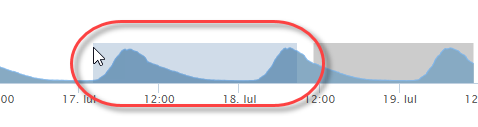
Live Audience Graph, Trailing 24 Hours:
Hover your pointer over the line to view the specifics of that point in time:

To change the period of time displayed, use your mouse to highlight a range on the lower part of the graph by clicking and dragging:
Campaigns Pending Approval:
Field and button definitions:
|
Field |
Description |
|
Campaign Name |
Click this column title to sort the list by campaign. |
|
Dates |
Click this column title to sort the list by the start and end dates for the campaign. |
|
Required |
Click this column title to sort the list by Required impressions. |
|
Target |
Click this column title to sort the list by Target. |
|
Actions |
Click this column title to sort the list by Actions. |
|
|
Click this button to refresh the list. |
|
See all pending campaigns |
Click this link |
Ads Missing Media:
This table lists all individual ads that do not currently have media associated with them and therefore are not playing properly.
Field and button definitions:
|
Item |
Description |
|
Campaign Name |
Click this column title to sort the list by campaign. |
|
Ad/Banner Name |
Click this column title to sort the list by the name of the ad or banner that is missing media. |
|
Dates |
Click this column title to sort the list by the start and end dates for the ad. |
|
Required |
Click this column title to sort the list by the number of impressions required. |
|
|
Click this button to refresh the list. |
|
See all campaigns missing media |
Click this link to view the Campaigns Missing Media screen. |