See the other web player topics for instructions on creating and editing the web player.
Below is a screenshot of how a sample v7 Player appears on a desktop. Almost all of the features listed are optional or customizable.
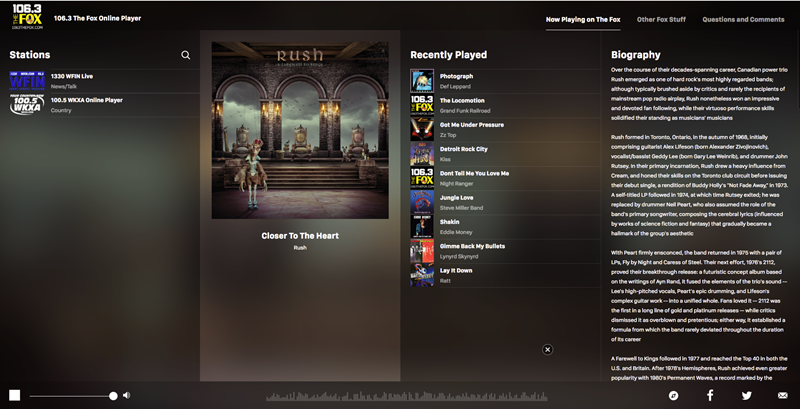
Features:
- Current Station Logo: Upper left corner, this is the station the user is currently playing. In this shot, it says 106.3 The Fox.
-
Stations: Left column. Lists the stations available to the user. They can search by clicking the magnifying glass icon and typing part or all of a station name in the box.

- Currently Playing: Untitled second column from the left. Shows the album art (if available), title, and artist for the track currently playing for music stations.
- Recently Played: This column lists the most recently played tracks.
- Biography: If available, displays an artist biography.
- Volume: Slider in the lower left of the player. The user can use this to start or stop play or to change the volume of the music.
- Sharing: Icons in the lower right corner. The user can share their listening status to Facebook, to Twitter, or by email.
For more information, see: